When an app is actively being developed, it tends to grow larger day by day. Over time, as engineers, we need to manage and maintain this growing codebase efficiently. If we don’t modularize it properly, we will eventually face significant challenges. Some of these include:
- Difficulty in maintenance
- Difficulty in adapting to new changes
- Slower build times
- Slower unit test feedback
- Increased complexity in making modifications
With a growing team and expanding codebase, it’s easy to introduce slow unit test feedback loops. This can significantly impact productivity, as developers will spend more time waiting for tests to complete rather than iterating on features. Therefore, it’s crucial to pay attention to this issue. By modularizing our codebase and combining it with macOS platform testing strategies when possible, we can drastically reduce unit testing time, resulting in much faster feedback loops.
To understand why modularization matters, let’s look at a real-world example from my project, Hui Shuo.
The Problem: Slow Unit Testing in a Monolithic App
I have an app called Hui Shuo, which is currently a simple list-based app with multiple screens and JSON fetching. For now, it’s small, but let’s look at some testing performance metrics.
When running unit tests for the entire app target, it takes 8.2 seconds to complete on an iOS simulator.

If we change any part of the codebase and rerun the tests, we will have to wait another around 8.2 seconds approximately. Imagine using a test-driven development (TDD) approach where we frequently run tests by pressing CMD + U. Every test run would require at least 8.2 seconds, which accumulates over time and slows down development.
As apps grow in size and complexity, testing speed becomes a critical bottleneck. Every second spent waiting for tests to complete is a second lost in development productivity. Without modularization, unit test feedback slows down, builds become sluggish, and iteration speed suffers. But there’s a way to fix this…
The Solution: Modularization
What if we could improve this process? Suppose you’re working on a specific feature, such as the networking layer. In a monolithic app, the networking code is part of the entire app target, meaning you must wait for 8.2 seconds each time you run unit tests. However, by separating this feature into its own dedicated module (e.g., Networking or Data Module), we can drastically reduce test execution time.
Using Swift Package Manager (SPM) for Modularization
For simplicity, I separated the non-UI components from the UI components in my project. The non-UI components include:
- Network layer
- Data models (Entities)
- Persistence layer
- Other core utilities
I named my data layer module Shared. Now, when working on networking-related code, I only need to run unit tests for the Shared module rather than the entire app. The results?
- Whole app target: 8.2 seconds
- Shared module target: 3.6 seconds

The Performance Gain
Comparing the two:
- Whole app tests: 8.2 seconds
- Shared module tests: 3.6 seconds
This means that testing the Shared module alone is approximately 2.28x faster.
Scaling Up: How Modularization Helps Over Time
Now, let’s consider an even larger-scale scenario. Suppose the project continues to grow, and running tests for the whole HuiShuo target eventually takes 20 seconds. Based on our speedup factor (2.28x faster), running tests only for the Shared module would take approximately 8.77 seconds.
This difference becomes even more significant in a real-world development cycle. Imagine running tests multiple times a day—waiting 20 seconds per run versus 8.77 seconds can drastically affect developer efficiency. Over weeks and months, this time loss accumulates, slowing down iteration speed and reducing productivity.
By modularizing our codebase and testing only the relevant parts, we ensure that as the project scales, unit test feedback remains fast, keeping development workflows smooth and efficient.
Further Optimizing Unit Test Speed: Running Tests on macOS
Can we speed things up even more?
Yes! One factor affecting unit test performance is running tests on an iOS Simulator. What if we could run unit tests directly on macOS instead?
By enabling macOS support for our Shared module, we avoid the overhead of running tests in a simulated iOS environment. Enabling it is by the project configuration, you can add a macOS target, or if we have a new project, we can just select multiplatform project setup.
- Running Shared tests on iOS Simulator: 3.6 seconds
- Running Shared tests on macOS: 1.4 seconds
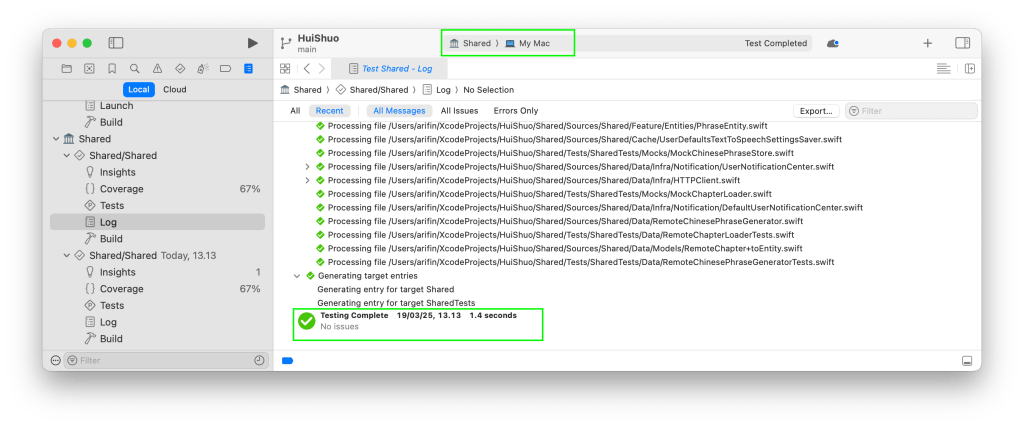
Now, what about running tests for the entire app module?
- Running HuiShuo app tests on iOS Simulator: 8.2 seconds
- Running HuiShuo app tests on macOS: 4.3 seconds

The Final Outcome
By leveraging both modularization and macOS-based testing, we achieve significant performance gains in unit test feedback speed. Faster tests mean:
- More efficient TDD workflows
- Less developer downtime
- Faster iteration cycles
- Improved overall productivity
- cheaper CI CD cost
- And more…
Side by Side Comparison
Let’s see the whole picture side by side. We can the test time is improved significantly faster.
| Before | After |
| |
| |
Conclusion
Maintaining fast unit test feedback is crucial as an app and team grow over time. Without proper modularization, unit testing can become painfully slow. By structuring code into independent modules and utilizing macOS-based testing strategies, we can drastically improve test execution speed. This results in faster development, quicker bug fixes, and a smoother engineering experience.
If you’re working on a growing iOS project, now is the time to start modularizing. Not only will it save you time today, but it will keep your project maintainable and efficient as your team and codebase scale. Start with one module, test the benefits, and see the difference! 🚀

 Arifin Firdaus Blog