Overview
Design patterns are a cornerstone of software development, providing reusable solutions to common problems. The Decorator Pattern is a structural design pattern that allows you to dynamically add new behavior to objects without altering their structure. It follows the Open/Closed Principle, which states that a class should be open for extension but closed for modification.
In this article, we’ll explore the Decorator Pattern in Swift by implementing an ImageLoader with fallback logic. We’ll also discuss its benefits, limitations, and how you can test it effectively.
Why Use the Decorator Pattern?
The Decorator Pattern extends functionality dynamically without modifying the original object or resorting to subclassing. It relies on composition, offering more flexibility while reducing tight coupling in the code.
Benefits of the Decorator Pattern
1. Extensibility
- Add new behaviors without modifying the base class or creating excessive subclasses.
- Adheres to the Open/Closed Principle, ensuring that existing implementations remain stable.
2. Flexibility
- Stack multiple decorators to build complex behavior incrementally.
3. Testability
- Each decorator can be tested independently, focusing on its specific functionality.
4. Dynamic Behavior
- Apply different decorators at runtime, making the system more adaptable.
Drawbacks of the Decorator Pattern
1. Complexity
- Excessive use can make the code harder to follow due to the layered structure.
2. Performance Overhead
- Each decorator introduces an additional level of delegation, which might slightly impact performance in critical systems.
How We Use It: An Example with ImageLoader
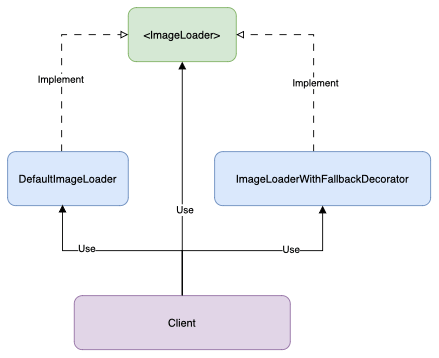
Let’s implement an ImageLoader that uses the Decorator Pattern. Here’s a step-by-step breakdown.

Step 1: Define the Protocol
The ImageLoader protocol defines the contract for loading images. We’ll use the any keyword to indicate existential usage of the protocol.
protocol ImageLoader {
    func loadImage(for item: String) -> Image
}
Step 2: Implement the Default Behavior
The DefaultImageLoader conforms to ImageLoader, simulating the loading of an image.
struct DefaultImageLoader: ImageLoader {
    func loadImage(for item: String) -> Image {
        // Simulate loading an image (returns a placeholder for simplicity)
        Image(systemName: "photo")
    }
}
Step 3: Add a Fallback with a Decorator
The ImageLoaderWithFallbackDecorator adds fallback logic to the ImageLoader. We use any to store the decorated instance and some for the initializer to accept any conforming type.
struct ImageLoaderWithFallbackDecorator: ImageLoader {
    private let decoratee: any ImageLoader
    private let fallbackImage: Image

    init(decoratee: some ImageLoader, fallbackImage: Image) {
        self.decoratee = decoratee
        self.fallbackImage = fallbackImage
    }

    func loadImage(for item: String) -> Image {
        // Simulate a condition where fallback is needed
        let hasImage = Bool.random() // Randomized for demonstration
        return hasImage ? decoratee.loadImage(for: item) : fallbackImage
    }
}
Step 4: Use the Decorator
Here’s how you can use the decorator:
let defaultLoader = DefaultImageLoader()
let loaderWithFallback = ImageLoaderWithFallbackDecorator(
    decoratee: defaultLoader,
    fallbackImage: Image(systemName: "exclamationmark.triangle")
)

let image = loaderWithFallback.loadImage(for: "exampleItem")
If the default loader fails to load an image (simulated with Bool.random()), the fallback image is used.
Testing the Decorator
The Decorator Pattern’s modularity makes it highly testable. You can isolate the decorator to verify its behavior independently.
Here’s a simple test for the fallback behavior:
func testFallbackBehavior() {
    let mockLoader = DefaultImageLoader()
    let fallbackImage = Image(systemName: "exclamationmark.triangle")
    let decorator = ImageLoaderWithFallbackDecorator(decoratee: mockLoader, fallbackImage: fallbackImage)

    let image = decorator.loadImage(for: "testItem")

    // Assert: Verify the returned image is either the fallback or the default
    // (In real tests, use XCTest to compare properties.)
}
This allows you to confirm the fallback logic without depending on the DefaultImageLoader.
Decorator and the Open/Closed Principle
The Decorator Pattern exemplifies the Open/Closed Principle:
• Open for Extension: Extend functionality dynamically with decorators.
• Closed for Modification: Keep the original ImageLoader implementation unchanged.
By wrapping existing functionality with decorators, you ensure that the core logic remains untouched, making the system more robust and stable while allowing new behavior to be added seamlessly.
Conclusion
The Decorator Pattern is a powerful tool for adding functionality dynamically while adhering to solid design principles like the Open/Closed Principle. Its compositional nature ensures flexibility, testability, and scalability. While it introduces slight complexity, the benefits often outweigh the trade-offs, especially in systems requiring modular and extensible design.
With the example of ImageLoader and fallback logic, you’ve seen how to apply the Decorator Pattern effectively in Swift. Use this pattern wisely to build maintainable and robust applications.
References
• “Design Patterns: Elements of Reusable Object-Oriented Software” by Erich Gamma, Richard Helm, Ralph Johnson, and John Vlissides (GoF Book)
• Head First Design Patterns by Eric Freeman, Elisabeth Robson, Bert Bates, Kathy Sierra

 Arifin Firdaus Blog